
Timetables for all degree programmes offered by the department
In this semester, too, the timetables for Dept 04 will only be distributed via WebUntis/Untis Mobil. This offers a number of advantages:
- the up-to-date timetable (including any changes) can be viewed in a web browser,
- The up-to-date timetable is always with you on your smartphone via the free ‘Untis Mobile’ app, even when you’re out and about, and is easy to read,
- Changes to the plan are applied immediately,
You can access the system via a web browser or using a smartphone via the ‘Untis Mobile’ app.
Enter ‘Dept 04’ as the school name there, and our department will appear. A ‘class user’ has been created for each study group, as shown in the table below, and you can log in using this:
| Study group | Username | Password |
|---|---|---|
| BAC1A | 1A | FK04_BAC1A |
| BAC1B | 1B | FK04_BAC1B |
| BAC1C | 1C | FK04_BAC1C |
| BAC1DI | 1DI | FK04_BAC1DI |
| BAC2A | 2A | FK04_BAC2A |
| BAC2B | 2B | FK04_BAC2B |
| BAC2C | 2C | FK04_BAC2C |
| BAC2D | 2D | FK04_BAC2D |
| BAC2DI | 2DI | FK04_BAC2DI |
| EIB3A | 3A | FK04_EIB3A |
| EIB3B | 3B | FK04_EIB3B |
| EMB3A | 3MA | FK04_EMB3A |
| REB3A | 3RA | FK04_REB3A |
| EIB4A | 4A | FK04_EIB4A |
| EIB4B | 4B | FK04_EIB4B |
| EMB4A | 4MA | FK04_EMB4A |
| REB4A | 4RA | FK04_REB4A |
| B5P | 5P | FK04_B5P |
| EIB6A | 6A | FK04_EIB6A |
| EIB6B | 6B | FK04_EIB6B |
| EIB7A | 7A | FK04_EIB7A |
| EMB6 | 6M | FK04_EMB6 |
| EMB7 | 7M | FK04_EMB7 |
| REB6 | 6R | FK04_REB6 |
| REB7 | 7R | FK04_REB7 |
| ELM1/2 | 12ME | FK04_ELM1/2 |
| SMM1 | 1MS | FK04_SMM1 |
| SMM2 | 2MS | FK04_SMM2 |
To view the timetable, click on ‘Further timetables’ on the website and select the class and the correct date (from 1 October 2026) at the top.
Under ‘Further timetables’, you can also view the timetables for other study groups. Simply select the relevant class here. This also applies to the FWPM/FWP2 modules. Simply select FWPM or FWP2 under ‘Class’.
The terms displayed in WebUntis, such as ‘pupil’, ‘class’, ‘teacher’ etc., are predefined by the programme and unfortunately cannot be changed.
Guide to WebUntis via a web browser
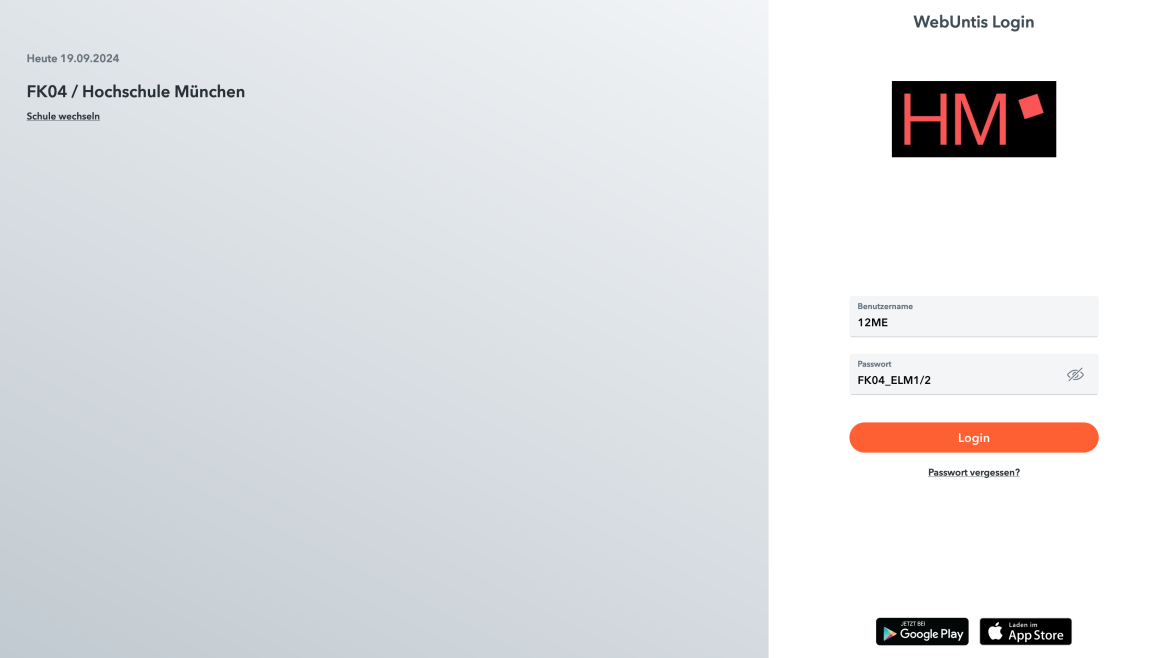
Log in using the username and password for your degree programme (see table). Here is an example for the master's degree in Electrical Engineering and Information Technology.
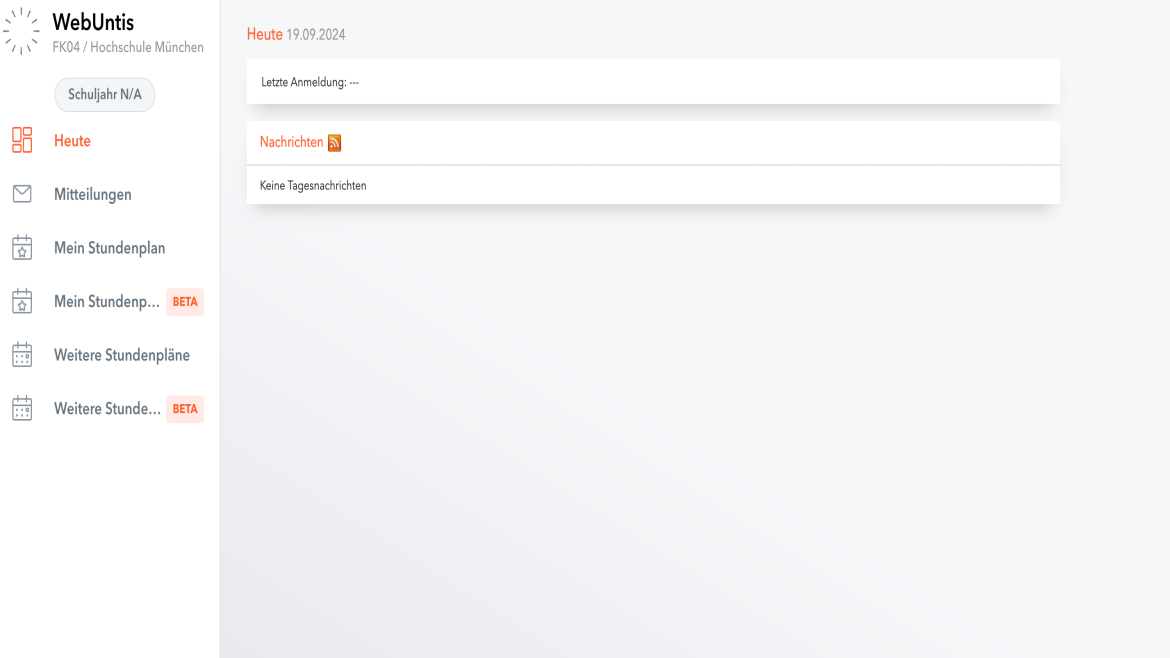
Here, you’ll need to click on ‘Further timetables’.
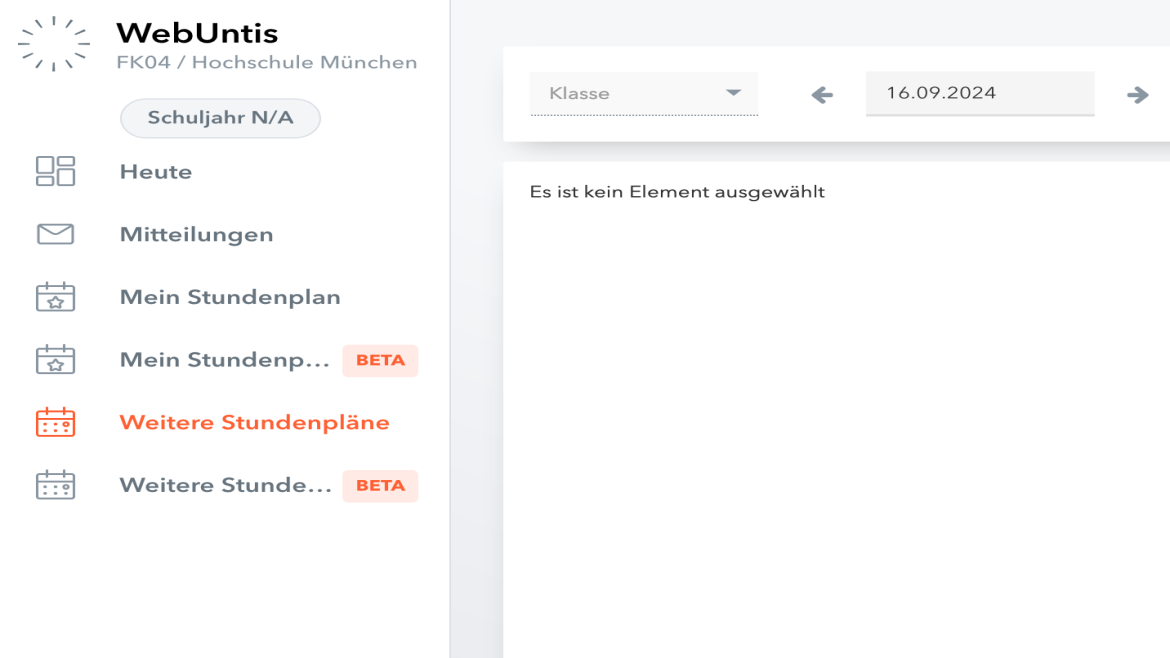
If you are on the ‘Further Timetables’ page, select the relevant class. In this example for the master's degree in Electrical Engineering and Information Technology, it is 1ME.
Please also note that the date has been set to 1 October 2024.
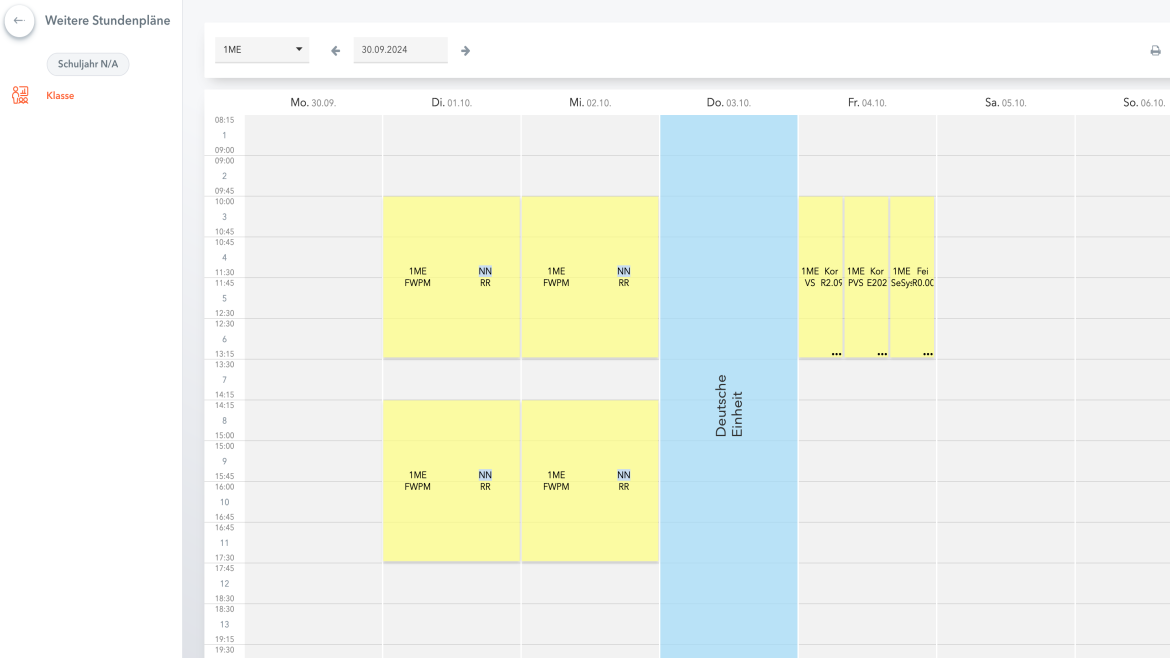
As soon as the class and date have been selected, the lectures for that week are displayed immediately.
Untis Mobile User Guide
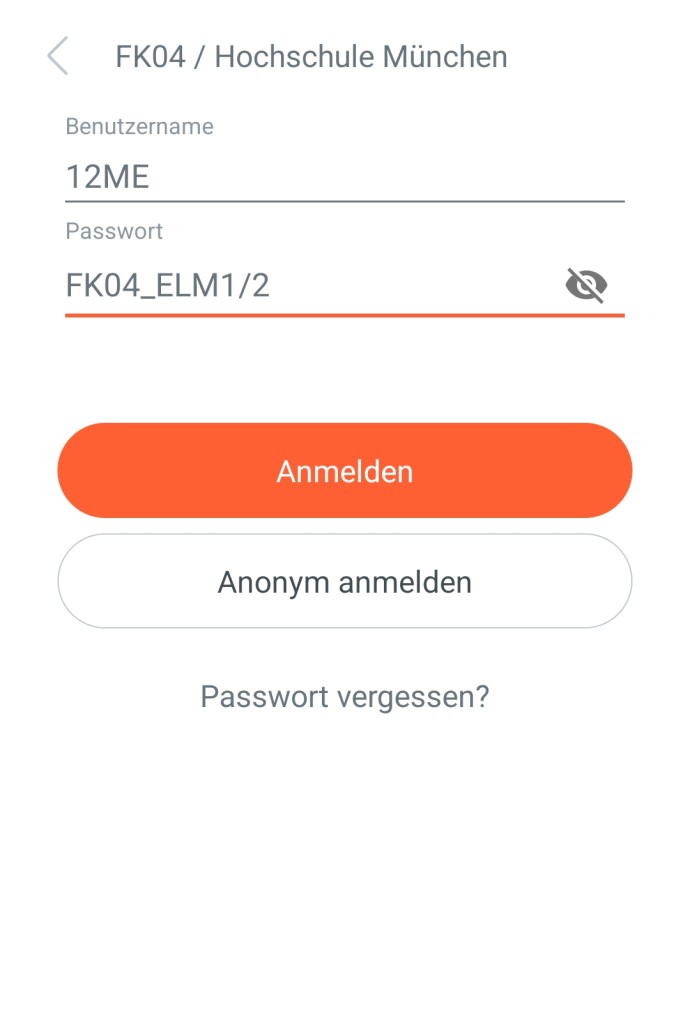
Under ‘Search for school’, enter Dept 04. Dept 04 / Hochschule München will then appear
here. If you click on this, you will be redirected to the login page where you can log in with your username and password. Enter your username and password
here as shown in the table above. Again, using the master's degree in Electrical Engineering and Information Technology as an example.
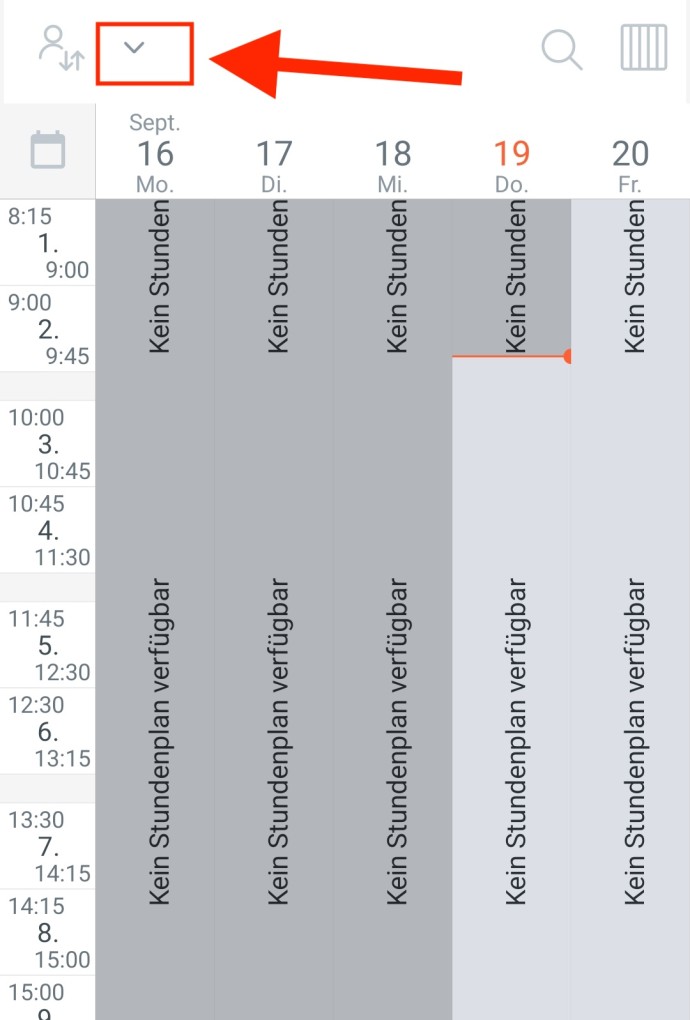
You will be taken to a timetable with no entries. To view your own timetable, click on the tick at the top.
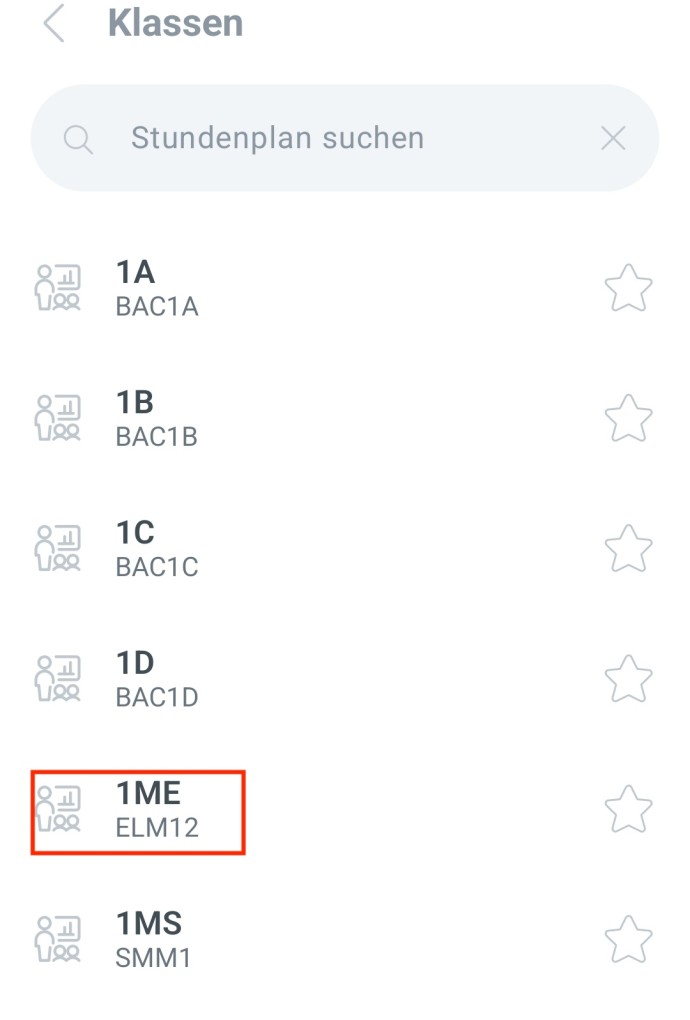
Here, you can then select the required "class".
You can also view the timetables for all other degree programmes here. If you click on the star on the right, this timetable will be added to your favourites.
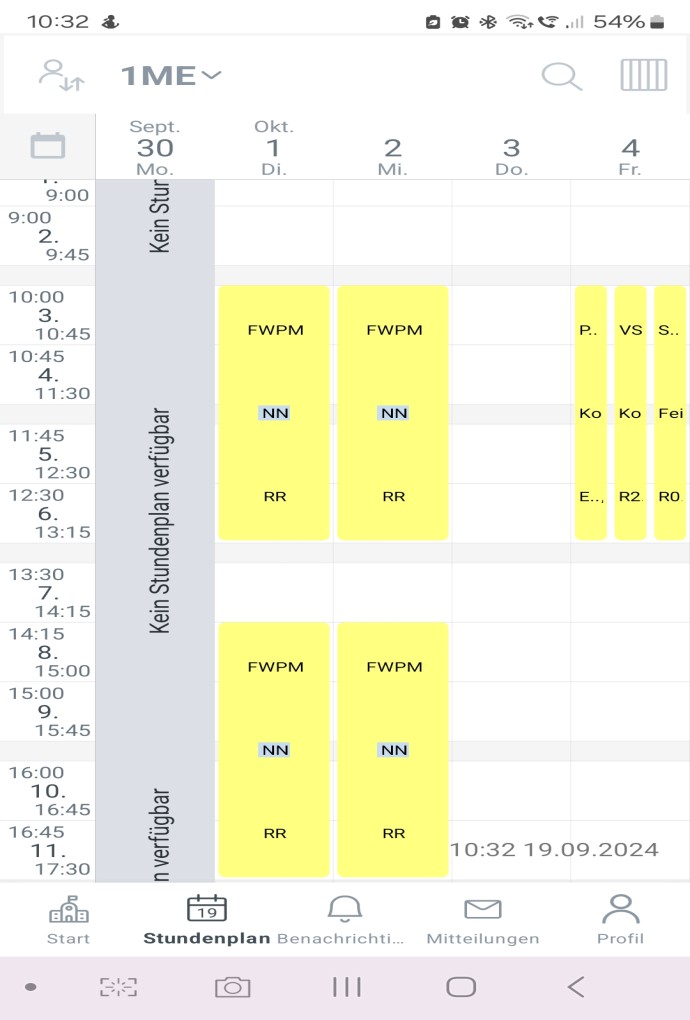
Once you have selected the class, you can swipe left or right to go to the relevant date.
Please note – fixed group allocation for the bachelor's degree programme
You can find the fixed timetables for the study group in the1st and 3rd semesters on Moodle. (Please log in using your university ID.)
- Access code for the first semester: Semester1
- Access code for the third semester: Semester3
- You can also find the group allocation for the practical seminar in the 5th semester on Moodle.
| EIB | Bachelor's degree in Electrical Engineering and Information Technology |
| REB | Bachelor's Degree in Renewable Energy – Electrical Engineering |
| EMB | Bachelor's Degree in Electrical Engineering – Electric Mobility |
| B5P | Semester: Internship period (bachelor's degree) |
| EIM (formerly known as ELM) | Master's degree in Electrical Engineering and Information Technology |
| SMM | Master's degree in Systems Engineering |
| BAC1B Bachelor's degree | bachelor's degree |
| BAC1B | Number of semesters |
| BAC1B | Study group |
| EIB3A | Electrical Engineering and Information Technology |